Two critical vulnerabilities, an early disclosure leak, and an emergency release have put PHP security firmly in the spotlight.
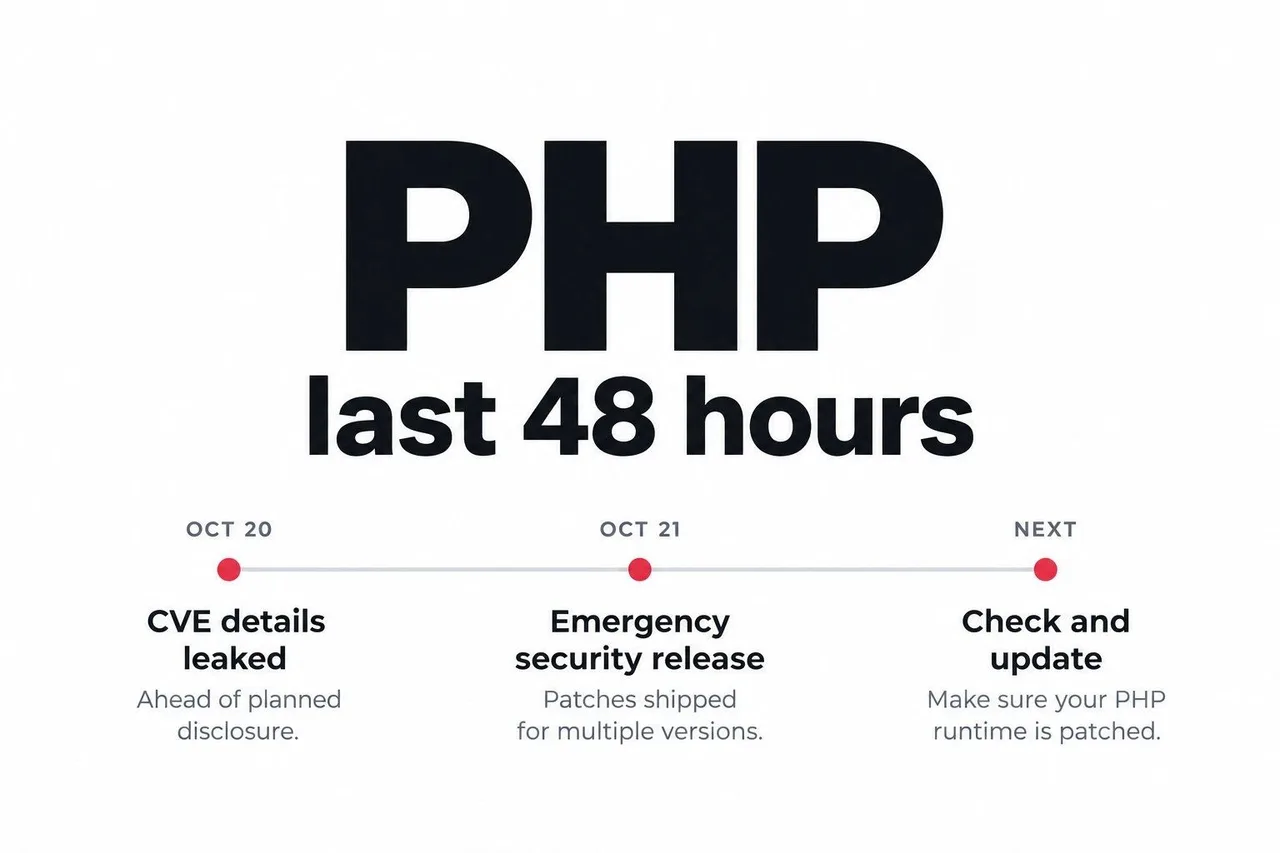
On October 21, 2026, the PHP project released updates addressing CVE-2026-109618 and CVE-2026-109619, which can allow unauthenticated remote code execution. For anyone running PHP in production, checking and patching the runtime should be an immediate priority.
Beyond the technical fixes, this incident raises a bigger question: are we giving the people maintaining essential open-source infrastructure enough support?
What Happened to PHP?
Both vulnerabilities carry a CVSS v4.0 score of 9.2, classified as critical. One involves corruption during out-of-memory handling; the other involves stale global state remaining after its underlying memory has been freed.
Remote code execution, or RCE, means an attacker may be able to make a vulnerable system execute code remotely. The potential consequences include application compromise, access to sensitive information, and disruption of services.
These issues affect PHP itself, making runtime maintenance essential alongside application security.
How the Disclosure Leak Changed the Release
According to the PHP Foundation, the CVE identifiers began circulating publicly on October 20, ahead of the planned disclosure. Those initial posts included an incorrect severity score and release time, but no technical details.
The project brought its announcement forward and moved the scheduled release from October 22 to October 21. This gave distributors time to prepare packages while shortening the wait for fixes.
The episode illustrates why coordinated disclosure matters: researchers, maintainers, hosting providers, and operating-system vendors need time to prepare a usable update path.
Why the 2024 Audit Matters
The most concerning detail is that early signs of the out-of-memory issue surfaced in 2024, during work connected to an external security audit.
At that point, concrete exploitation paths had not been established. Potential fixes also involved difficult trade-offs. The PHP Foundation later called the delay a “structural failure,” linking it to decision-making and insufficient resources. It outlined changes to security oversight and increased investment in security work.
That acknowledgment deserves attention. Finding a weakness is only one part of security engineering. Teams also need the capacity and authority to investigate it, resolve disagreements, and deliver a reliable fix.
Which PHP Versions Contain the Fixes?
The emergency releases include:
PHP branchSecurity releasePHP 8.28.2.35PHP 8.38.3.36PHP 8.48.4.27PHP 8.58.5.12
The PHP project urges users to update immediately and states that there are no complete mitigations. Install the appropriate patched release or a newer security release available for your supported branch.
Why Updating Composer Dependencies Is Not Enough
Composer manages your application’s PHP packages. It does not normally replace the PHP interpreter installed on your server.
Running composer update may update libraries, but it does not patch PHP itself.
Your runtime update must come through the relevant deployment channel, such as your operating-system packages, hosting provider, container image, or PHP installation process.
Keeping dependencies current remains valuable. It simply addresses a different layer of the stack.
What Production Teams Should Check Now
Start with an inventory of where PHP runs: public websites, APIs, administration panels, background workers, and container deployments.
Then:
Check the installed runtime. Use
php -vfor the command-line interpreter, and separately confirm which runtime serves web requests.Verify the available security package. If your vendor backports fixes, check its advisory and package revision.
Deploy the update. Include every affected server and container image.
Restart or redeploy the relevant processes. Confirm running services actually use the patched runtime.
Test important workflows. Check login, database access, uploads, scheduled jobs, and integrations.
Review monitoring and logs. Investigate unexpected errors, file changes, or unusual activity.
On managed hosting, ask the provider to confirm the deployed PHP version or vendor patch status.
Open Source Security Needs People, Time, and Funding
This incident offers a lesson that extends beyond PHP.
Open-source infrastructure supports businesses around the world, yet maintenance depends on people doing demanding work: investigating obscure failures, reviewing patches, checking compatibility, and coordinating releases.
Businesses that depend on these projects can help by funding maintainers, contributing engineering time, and making runtime upgrades part of normal operations.
The immediate priority is to patch PHP. The longer-term opportunity is to build a stronger system for finding and fixing the next vulnerability.
Practical Commands to Check and Update PHP
These examples help you identify your runtime and verify an update. Package names and service names depend on your installation.
1. Check the PHP CLI Version
php -v
php --ini
command -v php
These commands show the command-line PHP version, configuration files, and executable path. Your website may use a different PHP version through PHP-FPM or Apache.
2. Identify PHP-FPM Services on Ubuntu
systemctl list-units --type=service --all 'php*-fpm.service'For an Nginx installation, inspect which PHP-FPM socket or upstream is configured:
sudo nginx -T 2>/dev/null | grep -n 'fastcgi_pass'For example, a configuration referencing
php8.3-fpm.sockindicates that the site connects to a PHP 8.3 FPM service.
3. Check Available Ubuntu Package Updates
The following example assumes PHP 8.3 was installed using APT:
sudo apt update

apt-cache policy php8.3-cli php8.3-fpm php8.3-common
Check the candidate package against your package provider’s security advisory. Vendors may backport security fixes without changing the upstream version number to the latest PHP release.
4. Update the Installed PHP Packages
For an existing PHP 8.3 CLI and FPM installation:
sudo apt install --only-upgrade \
  php8.3-cli \
  php8.3-fpm \
  php8.3-common
Include other installed PHP extension packages in your update plan. Adjust package names for your PHP branch and repository.
After updating, restart the matching FPM service during your deployment window:
sudo systemctl restart php8.3-fpm
sudo systemctl status php8.3-fpm --no-pager
Restart long-running PHP workers through their process manager as well.
5. Verify the Runtime After Updating
php -v
php-fpm8.3 -v

dpkg-query -W \
  -f='${Package}\t${Version}\n' \
  php8.3-cli php8.3-fpm php8.3-common
Confirm the package revisions contain the security fixes and test your website’s important workflows.
6. Check PHP Inside a Docker Container
docker exec <container-name> php -vAfter updating your Dockerfile or base-image reference to a verified patched image, rebuild and recreate the service:
docker compose build --pull <php-service>
docker compose up -d --no-deps <php-service>
docker compose exec <php-service> php -v
Update the image reference in your deployment configuration if the service uses a prebuilt image instead of a local build.
Composer Updates Do Not Replace PHP Updates
# Checks application dependencies for known advisories
composer audit

# Shows the installed PHP interpreter version
php -v
These commands inspect different layers. A clean Composer audit does not confirm that the PHP runtime is patched.
Written by
Admin
Published October 23, 2026 · 5 min read